

Scams feel different when they arrive wearing a familiar face. An email from a stranger is easy to distrust, but an email that appears to come from a real contact can slip past the little guardrails most of us rely on during a busy workday.
That’s what made this one so believable. I was expecting a routine business document, and the message claimed a file had been shared through Adobe Document Cloud. In this blog, I’ll walk through what happened, why the email felt normal at first, what changed after I clicked, and what you should do if a similar message lands in your inbox.
The Click That Made the Room Tilt
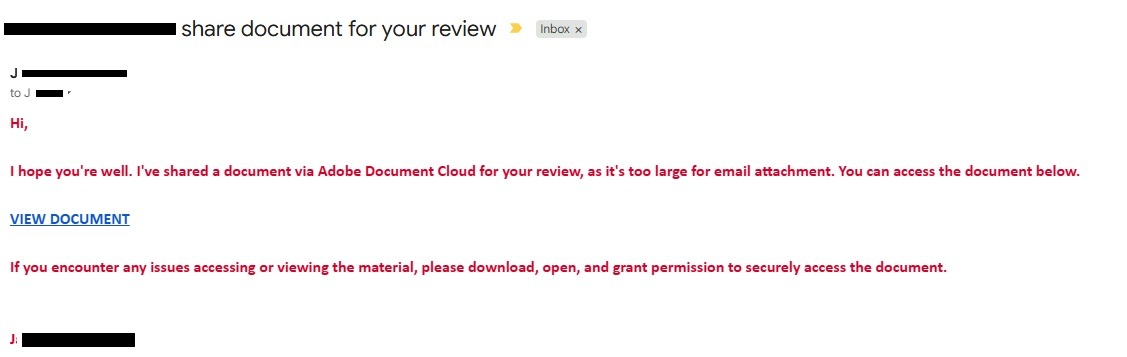
The email looked like it came from someone I had a legitimate reason to hear from. There was no dramatic warning, no wild promise, no obvious nonsense. It said a document had been shared and included a “View Document” link, which made sense in the moment because I was already expecting a business file.
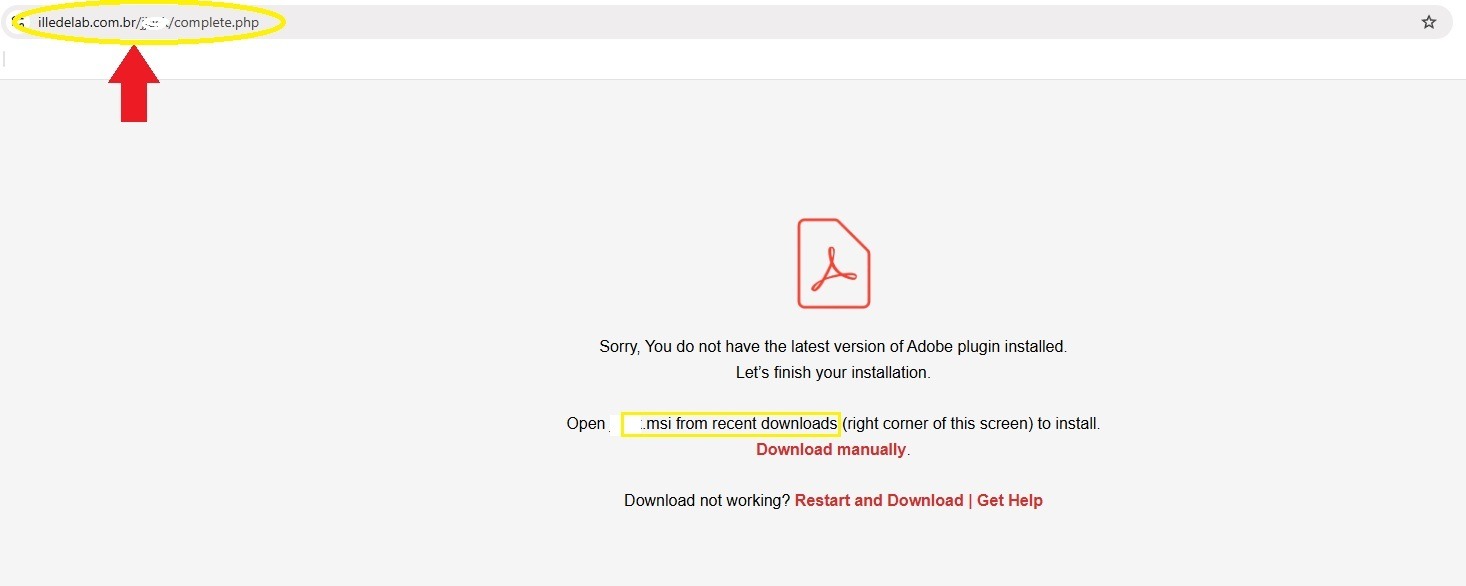
I clicked, which took me to a page claiming I needed the latest Adobe plugin to view the document. Then the page tried to automatically download a Windows installer file with a .msi extension. Unfortunately, I wasn't looking at the file extension, and went ahead and clicked "save". When the document didn't pop up as I expected, I went to my browser's downloads list and saw something that shocked me back into the real word: "failed: virus detected."
That's when I started paying attention. I went back and noticed all the inconsistencies that were so subtle, they were practically invisible. It was hard to wrap my head around being fooled by the very thing I help warn people against every day. Thankfully, despite my risky click, I never ran the installer or entered any credentials on a fake page. If I had, this might be a very different conversation.
Why This Email Felt Believable
The strongest part of this scam wasn’t fancy graphics or complicated technology. It was timing. I was already expecting a document, and the message came from a real business contact. For homeowners, small business owners, contractors, office managers, and anyone who handles invoices, estimates, insurance certificates, inspection reports, or service agreements, that’s exactly the kind of message that blends into a normal day.
The Federal Trade Commission has warned that phishing messages often pretend to come from companies or organizations people know and trust, with the goal of getting someone to click a link or open an attachment. The FTC also reported that email was the top method scammers used to contact people in 2024.
There’s another possibility worth naming carefully. Since the message actually came from a real contact’s email address, the account may have been compromised, spoofed, or abused in some way. However it may have happened, the lesson is simple: a familiar name in the “from” field isn’t enough.
The Warning Signs After the Click
Once I slowed down, the red flags were easier to see. The link did not go to an official Adobe domain. A shared document should not require downloading a random installer. A .msi file is not a normal document. It’s a Windows installer, meaning it can make changes to a computer if someone runs it.
The page also pressured me to install something before I could continue. That’s a classic moment where the scam tries to hurry your hand. A legitimate document sharing process should not turn into a surprise software installation, especially when you were only trying to view a PDF document.
One smaller detail stood out after I looked again: the email appeared to be addressed to the sender themselves, with me likely blind copied. That felt unusual for the kind of document exchange I was expecting. By itself, that might not prove anything, but paired with a strange link and an automatic installer download, it became part of the pattern.
CISA’s phishing guidance notes that attackers may include personal or company-specific details to make fake messages appear real, and that messages may appear to come from known contacts whose accounts were compromised.
What To Do If This Happens To You
When a message feels even slightly off, treat the next few minutes like a safety pause, not a panic button. Here’s the practical path:
- Do not open the downloaded file. Delete it or leave it quarantined if security software blocked it.
- Report the email as phishing through your email provider or workplace system.
- Contact the person through a separate trusted method, such as a phone number or email thread you already know is legitimate.
- Change passwords if you entered credentials.
- Contact IT or a cybersecurity professional if the file was opened or installed.
For shared networks, it’s also smart to tell anyone else in your organization who may have received the same message. A scam that almost worked on one person may already be sitting in another inbox, waiting for a busier moment.
The Takeaway: Slow the Hand Before the Click
This scam almost worked because it borrowed trust from a real relationship. That’s what made it useful as a warning. The email didn’t need to look outrageous. It only needed to look ordinary enough.
Before opening a shared document, check where the link is taking you. Be suspicious when a file view turns into a software download. Never run a surprise installer just to read a document. A few extra seconds can keep a routine email from becoming a much bigger problem.