

If you’ve seen an email telling you something like “Document completed via DocuSign” and you weren’t expecting it, you could be looking at a phishing scam. These fraudsters are capitalizing on the popularity and familiarity of the Docusign brand to trick people into giving up their log-in credentials or clicking malicious links.
In this article you will learn how these fake Docusign messages work, the specific warning signs to watch for, and what to do if you think you clicked on something suspicious.
Understanding how the scam operates gives you a better chance of avoiding it. With the right mix of awareness and a few simple precautions you can keep your information safer and prevent a small mistake from becoming a serious breach.
How Fake Docusign Emails Typically Work
The most common version of the scam begins with an email that looks official. It may include the Docusign logo, similar colors, and a button urging you to review a document. The message might claim there is a contract waiting, a timesensitive form that needs attention, or a notice that your access will be restricted unless you sign immediately.
Clicking the link sends you to a fake website designed to mimic the real Docusign login page. Once you enter your email and password, scammers capture your credentials. Many victims do not realize anything is wrong until they discover unauthorized access to their email or other accounts that use the same password.
Docusign warns users to be cautious with any message they are not expecting and encourages people to always open documents from within a verified account instead of through email links.
Warning Signs That Reveal a Scam
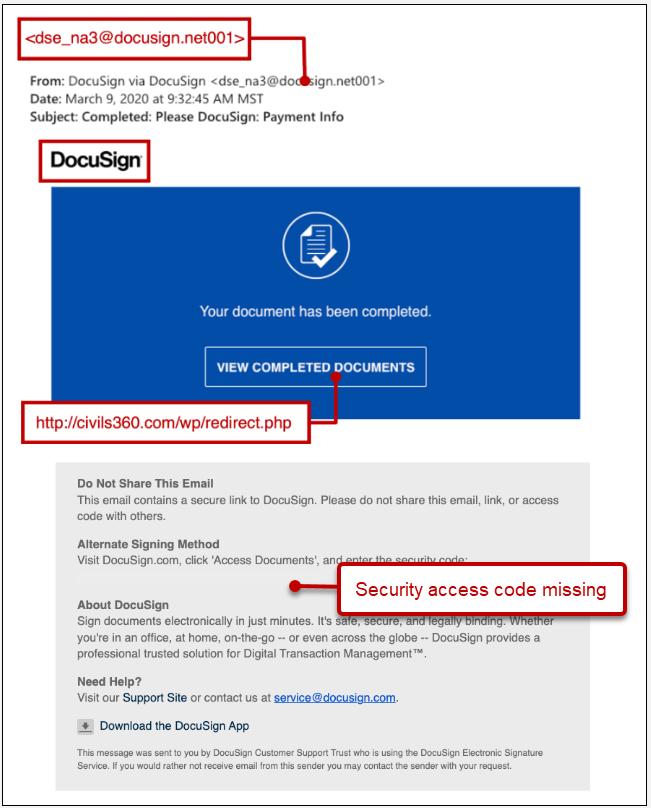
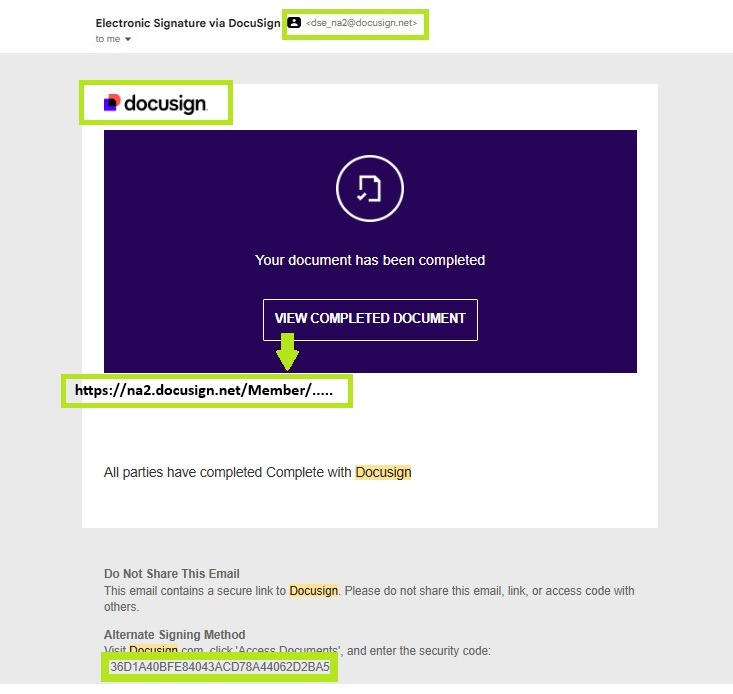
Several clues can help you identify a fake Docusign message before you click. Look closely at the sender address. Real messages come from docusign.com or docusign.net. Scammers often use misspelled domains or unrelated addresses.
Another thing is the updated Docusign logo and brand. Up until April 2024, the company was spelled “DocuSign” (notice the capital ‘S’). Now, it is “Docusign” (lowercase ‘s’)! It’s a small difference, and relatively recent, so it’s easily overlooked – even by the scammers themselves! If you get a suspicious email, take a look at the logo and overall brand color scheme. If it doesn’t match what you see on the official website, report it.
Generic greetings are another sign, since genuine Docusign notifications usually include your name. Suspicious messages may also create a false sense of urgency, claiming that your access will expire unless you act quickly. If you hover your cursor over a link and the address that appears does not match an official Docusign site, do not click it.
Docusign includes a unique security code in legitimate email notifications. If the message you received does not include one, that is a strong indication something is wrong. Unsolicited attachments are also a problem because real Docusign messages rarely send files directly.
When You Can Handle the Issue Yourself and When to Seek Help
Most of the time you can protect yourself with simple steps. Instead of clicking links, open your browser and type in the Docusign website address directly. Enable two factor authentication on your email and Docusign account. Update your antivirus software and avoid reusing passwords across different services.
If you believe a scammer gained access to a business account or sensitive work documents, professional help may be necessary. Companies that store client information, financial data, or internal records should seek advice from a cybersecurity expert if a phishing attack succeeds. A single compromise can affect an entire network, so a full security review may be needed.
What Makes This Scam More Sophisticated Than It Used To Be
Docusign warns that recent phishing attacks are becoming harder to recognize. Some fraudulent emails are routed through legitimate forwarding services, which helps hide the true sender. In other cases, scammers host fake login pages on decentralized networks that are more difficult to remove.
This evolution means relying only on visual cues is no longer enough. Verification has to become a habit. Even if a message looks polished, always assume it could be a copy unless you were expecting a document from a specific sender.
Protect Yourself Before You Click
If a message claiming to be from Docusign seems suspicious, forward it to verify@docusign.com as instructed by DocuSign’s security guidance. After reporting it, delete the message and change your password. When in doubt, log in to your Docusign account directly to confirm whether a document is truly waiting.
Awareness is your best protection. The more familiar you become with legitimate Docusign emails, the easier it is to spot an impersonator. Smart habits can prevent a simple click from turning into a costly mistake.